Tools / Heuristic review
Heuristic review Free
Nielsen's ten heuristics as a worksheet for a screen or flow, with keyword and markup signals that point at where to look, review prompts for each heuristic, and the 0 to 4 severity scale. The judgement stays with you.
MCP tool name: heuristic_worksheet. REST: POST /api/heuristics. Free: 20 runs a day per IP. Pro: no cap.
Ask for it in plain words
Build a Nielsen ten-heuristics review worksheet for a screen or flow. Give text (the copy of the flow), html or a url. Returns, for each heuristic, keyword and markup signals found or missing, review prompts, and blanks for findings and 0 to 4 severity. The signals point at where to look; a human evaluation is still required.
Inputs
| Name | Type | Meaning |
|---|---|---|
text | string | Screen or flow copy |
html | string | Page HTML, if you have it instead of a URL |
url | string | Public page to read instead of pasted text |
task | string | The task the reviewer is evaluating, e.g. 'change a billing address' |
* required
Example
curl -X POST https://designers.allthepossibles.com/api/heuristics \
  -H "content-type: application/json" \
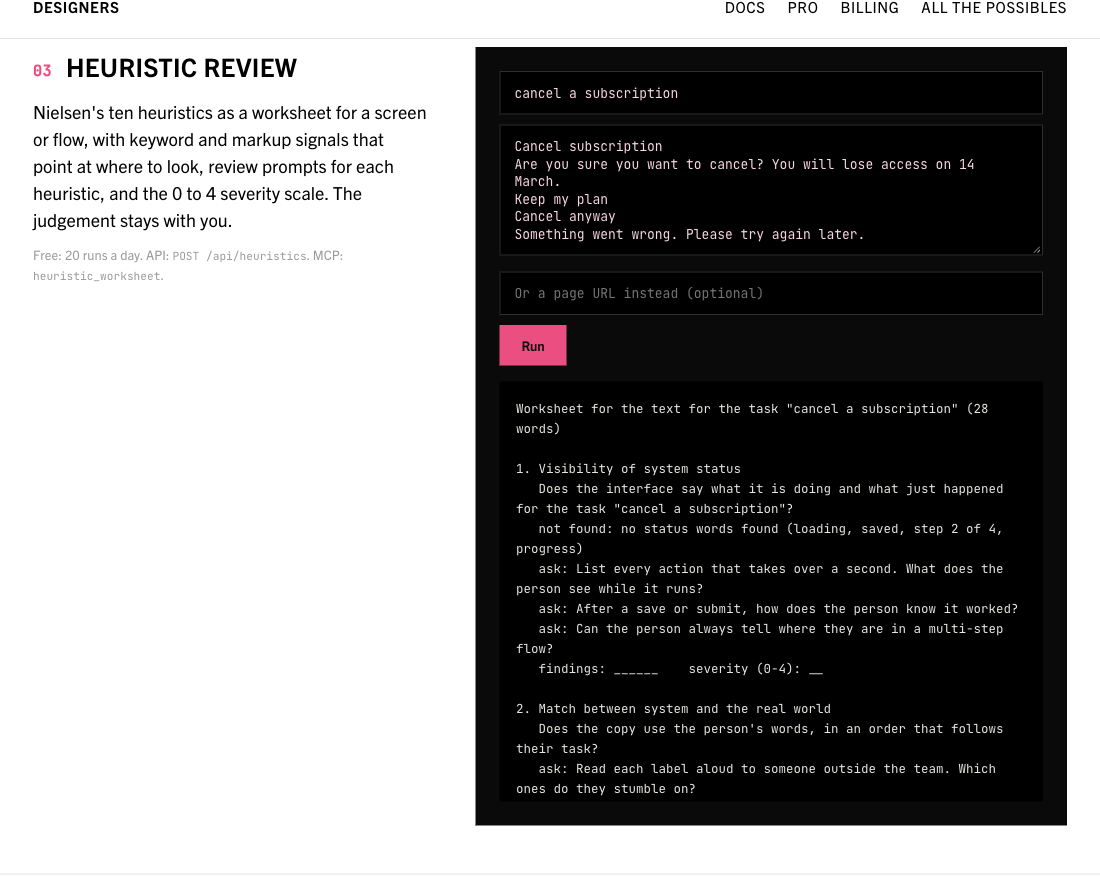
  -d '{"task":"cancel a subscription","text":"Cancel subscription\nAre you sure you want to cancel? You will lose access on 14 March.\nKeep my plan\nCancel anyway\nSomething went wrong. Please try again later."}'
Example output
The report field, for the input above (structured fields come back alongside it):
Worksheet for the text for the task "cancel a subscription" (28 words)

1. Visibility of system status
   Does the interface say what it is doing and what just happened for the task "cancel a subscription"?
   not found: no status words found (loading, saved, step 2 of 4, progress)
   ask: List every action that takes over a second. What does the person see while it runs?
   ask: After a save or submit, how does the person know it worked?
   ask: Can the person always tell where they are in a multi-step flow?
   findings: ______    severity (0-4): __

2. Match between system and the real world
   Does the copy use the person's words, in an order that follows their task?
   ask: Read each label aloud to someone outside the team. Which ones do they stumble on?
   ask: Do the icons have an everyday meaning, or one only your team knows?
   ask: Is the order of steps the order the person thinks in?
   findings: ______    severity (0-4): __

3. User control and freedom
   Can people back out of a mistake without losing work for the task "cancel a subscription"?
   signal: exits present: cancel
   ask: For each destructive or committing action, where is the way out?
   ask: Can a person leave a flow halfway and resume it?
   ask: Does the back button do what they expect?
   findings: ______    severity (0-4): __

4. Consistency and standards
   Does the same thing always look and read the same, and follow platform convention?
   ask: List every label used for confirm, save and remove. Are they one set?
   ask: Do components that look alike behave alike?
   ask: Where do you break a platform convention, and is it worth it?
   findings: ______    severity (0-4): __

5. Error prevention
   Does the design stop mistakes before they happen?
   signal: prevention language: are you sure
   ask: Which inputs have a format? Is the format shown before the person types?
   ask: What is the most expensive mistake on this screen, and what stops it?
   ask: Are defaults the safe choice?
   findings: ______    severity (0-4): __

6. Recognition rather than recall
   Is everything the person needs visible, so they do not have to remember it?
   ask: What does the person have to carry from one screen to the next?
   ask: Are options shown or hidden behind a memory test (commands, codes, icons)?
   ask: Do recent items and prior choices reappear?
   findings: ______    severity (0-4): __

7. Flexibility and efficiency of use
   Can experts go faster without slowing newcomers down?
   not found: no search, shortcut, saved or bulk wording found
   ask: What does the hundredth use of this flow look like?
   ask: Which steps could be skipped, remembered or batched?
   ask: Is there a keyboard path?
   findings: ______    severity (0-4): __

8. Aesthetic and minimalist design
   Does every element earn its place against the task?
   ask: Cover half the screen. What can go without losing the task?
   ask: Which one action should win, and does it?
   ask: What is repeated that could appear once?
   findings: ______    severity (0-4): __

9. Help users recognize, diagnose and recover from errors
   Do error messages say what went wrong and what to do next, in plain words?
   signal: generic error wording: something went wrong, try again later
   signal: recovery wording present: try again
   ask: Trigger every error you can. Does each one name the field or cause?
   ask: Does the message offer the fix, or only the verdict?
   ask: Is the person's input kept after the error?
   findings: ______    severity (0-4): __

10. Help and documentation
   Can people find help at the moment they need it, in the words of their problem?
   not found: no help, support, docs or FAQ wording found
   ask: Where is help on the hardest screen?
   ask: Is help written around tasks, not features?
   ask: Does help open in context or take the person away?
   findings: ______    severity (0-4): __

Severity: 0 I don't agree this is a usability problem; 1 Cosmetic: fix if time allows; 2 Minor: low priority; 3 Major: important to fix, high priority; 4 Catastrophe: must fix before release

A heuristic evaluation is done by people. Nielsen found that one evaluator catches about a third of the problems and five catch about three quarters, so have several people work through the same task separately, then merge. The signals above come from keyword and markup checks on the text you gave; they point at where to look and say nothing about severity.
What it looks like
Limits of this tool
The signals are keyword and markup checks. A heuristic evaluation is a human method: use several evaluators on one task.